一、操作步骤
打开powershell管理员模式
输入以下命令查看当前版本
DISM /online /Get-CurrentEdition
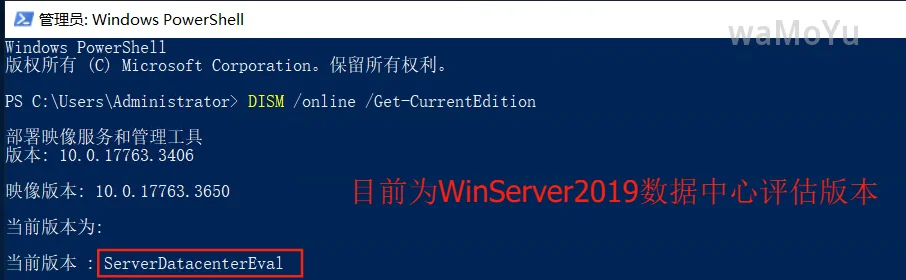
输入以下命令转为正式版
DISM /online /Set-Edition:ServerDatacenter /ProductKey:WMDGN-G9PQG-XVVXX-R3X43-63DFG /AcceptEula
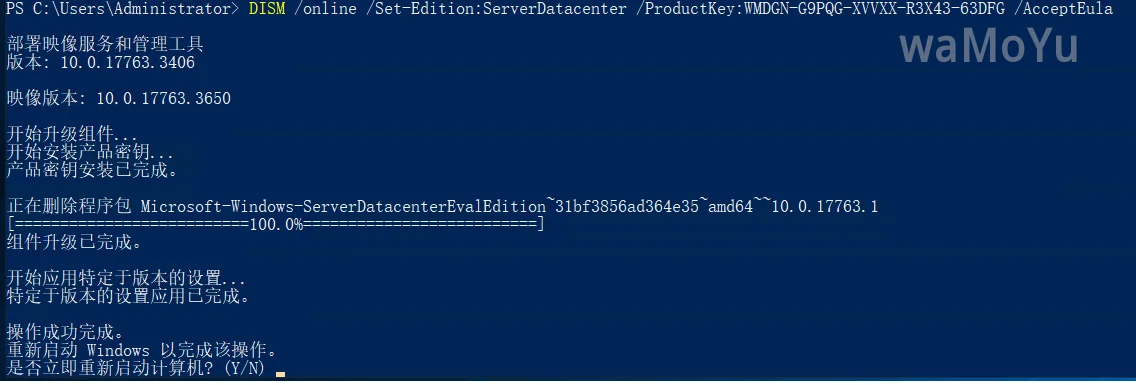
命令执行完毕后,重启计算机即可。
二、密钥
来源:https://learn.microsoft.com/zh-cn/windows-server/get-started/kms-client-activation-keys?tabs=windows1110ltsc%2Cwindows81%2Cserver2016%2C2012r2
操作系统版本 | GVLK 密钥 |
|---|
Windows Server 2025 标准 | TVRH6-WHNXV-R9WG3-9XRFY-MY832 |
Windows Server 2025 数据中心 | D764K-2NDRG-47T6Q-P8T8W-YP6DF |
Windows Server 2022 Standard | VDYBN-27WPP-V4HQT-9VMD4-VMK7H |
Windows Server 2022 Datacenter | WX4NM-KYWYW-QJJR4-XV3QB-6VM33 |
Windows Server 2019 标准 | N69G4-B89J2-4G8F4-WWYCC-J464C |
Windows Server 2019 数据中心 | WMDGN-G9PQG-XVVXX-R3X43-63DFG |
Windows Server 2016 标准 | WC2BQ-8NRM3-FDDYY-2BFGV-KHKQY |
Windows Server 2016 数据中心 | CB7KF-BWN84-R7R2Y-793K2-8XDDG |
Windows Server 2012 R2 标准版 | D2N9P-3P6X9-2R39C-7RTCD-MDVJX |
Windows Server 2012 R2 Datacenter | W3GGN-FT8W3-Y4M27-J84CP-Q3VJ9 |
参考:Windows Server评估版/正式版/数据中心版的来源及转换